Adobe has released version 9 of its Photoshop Elements image-editing software. Both the Windows and Mac versions feature an updated Spot Healing Brush (adapted from Photoshop CS5's Content Aware Fill tool), improved Photomerge options and direct upload tools. The 'Organizer' which was previously only available with the Windows version is now included for Mac OS. The software is available now at a retail price of $99.99, and US users can also install the Photoshop Elements 9 'Plus' at an additional fee of $49.99 per year, which adds 20GB of online storage and backup facilities. The company has also released version 9 of its Premiere video-editing software for Windows, which is now for the first time for Mac users.
SAN JOSE, Calif., — Sept. 21, 2010 — Adobe Systems Incorporated (Nasdaq:ADBE) today announced Adobe® Photoshop® Elements 9 software for Windows® and Mac, offering a complete photo solution to anyone who wants to organize, edit, create and share extraordinary photos. With the newest version of the No. 1 selling consumer photo-editing software,* Adobe delivers powerful new technology to equip every consumer with the ability to achieve professional results easily and quickly.
“The Photoshop brand has been creating groundbreaking imaging magic for 20 years, and Photoshop Elements has been making that magic accessible to mere mortals for nearly a decade,” said Kevin Connor, vice president of product management for Digital Imaging, Adobe. “The Content Aware Fill technology introduced with Photoshop CS5 is one of our most exciting innovations ever, so we’re thrilled to be able to make it accessible to photo and video enthusiasts in this latest Elements release.”
Image Intelligence for Easy Editing
Photoshop Elements 9 uses powerful technology to make even the most complex results achievable for anyone. Adapted from Photoshop CS5’s celebrated Content Aware Fill feature, the content intelligence in the Spot Healing Brush analyzes what’s in the image and quickly de-clutters or repairs photos (like removing tourists from a crowded scene or an obstruction, such as a telephone pole) with a swipe of a brush, magically filling in the background. The same content intelligence synthesizes missing pixel information to create a stunning panorama from multiple photos, without leaving any gaps or blank spaces.
In addition, the new Photomerge Style Match turns drab photos dramatic by analyzing characteristics of any photo, such as contrast or color tone, and automatically applies those qualities to another photo, allowing users to easily replicate any photo style. Several new Guided Edit options walk users step-by-step through the process of achieving cool editing effects such as Out of Bounds, making an element of a photo appear to leap off the page in 3D, creating pop art masterpieces, or retouching made easy via the perfect portraits feature. In addition, users now have access to Layer Masks for compositing richly layered photos.
Organization Made Easy
For the first time, the popular Photoshop Elements Organizer is available on both the Windows and Mac platform, to help users quickly organize, find and display photo and video clips from one convenient location. The Auto-Analyzer takes the work out of finding the best shots by automatically searching a user’s collection of photos and assigning a tag based on quality, such as lighting, focus or contrast. People Recognition also automatically creates People tags, so you can find your favorite people fast and it becomes more intelligent over time as it learns to associate specific faces with names.
Sharing Photos Virtually Anywhere
After users make their photos look better than ever, they have various sharing options, including posting photos directly to Facebook or creating one-of-a-kind interactive Online Albums with animated templates. In addition, users can share their memories with personalized photo creations like scrapbook pages, photo books, calendars and cards that can easily be printed from home or via online print service providers. The flexible photo creation workspace allows users complete control over how they design their photo books, by automatically placing photos within a template or providing access to any Photoshop Elements editing feature from directly within the layout mode.
Adobe Photoshop Elements 9 Plus
For added convenience, now Photoshop Elements 9 Windows and Mac users have the option to purchase Plus, which offers 20GB of storage for automatic online backup and sharing (up to 15,000 photos or four hours of DVD-quality video), as well as ongoing deliveries of new tutorials, artwork and interactive online templates sent directly to the desktop software. A benefit to all Photoshop Elements users is virtually anywhere access to photos and videos online or via select mobile devices at Photoshop.com.
Pricing and Availability
Adobe
Photoshop Elements 9 for Windows and Mac is available now at
www.adobe.com, and will also be available soon at retail outlets such as Amazon.com, Apple (Mac only), Best Buy, Costco, Fry’s, New Egg, Office Depot, Office Max and Walmart. Photoshop Elements 9 Windows and Mac is available for a suggested retail price of US$99.99, and users can purchase Plus from within the product for US$49.99/year. Plus is available in the U.S. only.
* Source: The NPD Group/Retail Tracking Service (April 2002 to March 2010) based on units sold (U.S. only).
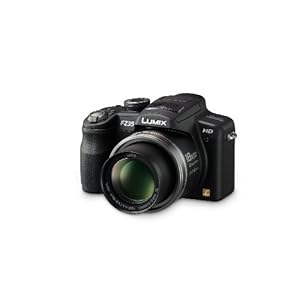 Corrective power for visibly clearer zooming. Hybrid still/motion images with POWER O.I.S. and an 18x optical zoom AVCHD Lite Beautiful HD movies, extended shooting time The FZ35 records HD movies with 1280 x 720-pixel resolution. It uses the AVCHD Lite format (MPEG-4/H.264) to achieve higher image quality while storing less data than the conventional Motion JPEG. Plus, the FZ35 is equipped with an HDMI output terminal for direct transmission of digital image and sound signals. Just connect the camera to an HDTV using a single HDMI mini cable (optional) for fast and easy slideshow enjoyment. Creative Movie mode: You can adjust the aperture and shutter speed any way you like. This mode gives you a wider range of expressive possibilities to explore in your movie making. Zoom-in movie: You can zoom in and out while shooting movies. Stereo mic: This camera features Dolby Digital Stereo Creator, which records dynamic, true-to-life audio to bring out the power of your HD images. IA mode (Movie): You can also use iA mode to shoot movies, and let the camera do all the work for you. High-speed response for truly intuitive shooting Enjoy high-speed 1.2-second start-ups, AF speeds of approximately 0.3 second, and up to five consecutive shots at 2.3 frames per second with full resolution. You can also take up to 470 photos with a single battery charge (CIPA). This comfortable level of performance lets you capture even the most fleeting shutter chances. Wide-angle 27mm LEICA DC VARIO-ELMARIT lens and 18x optical zoom The bright F2.8 LEICA DC VARIO-ELMARIT lens ranges from 27mm wide-angle all the way to 486mm telephoto. Combined with the double* corrective power of the improved POWER O.I.S., this makes it possible to capture subjects clearly without hand-shaking, even in the telephoto range. *Panasonic comparison

 Digital Photography And Accessories RSS Feed